Drink comparison made practical

Compare drinks by calories, alcohol, and serving size.

Compare calories, ABV, serving size, standard drinks, and efficiency across beer, wine, cocktails, and mixed drinks. Sort menus, save favorites, and make informed choices in seconds.

Calories when you want the lighter option ABV when you care about strength Standard drinks for a consistent measure of alcohol Efficiency when you want alcohol relative to calories
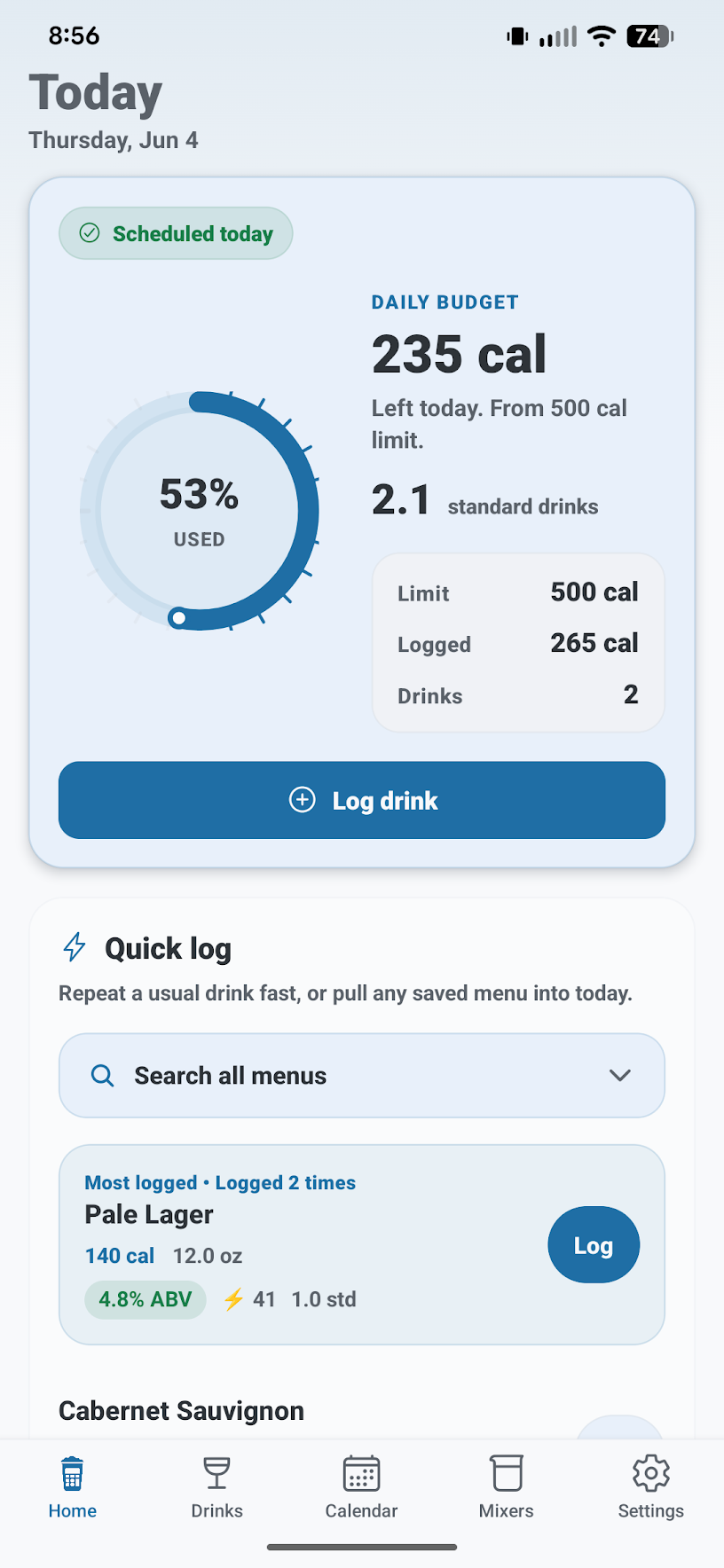
Alcolytics home screen with today's calorie budget, quick log, and recent drinks.
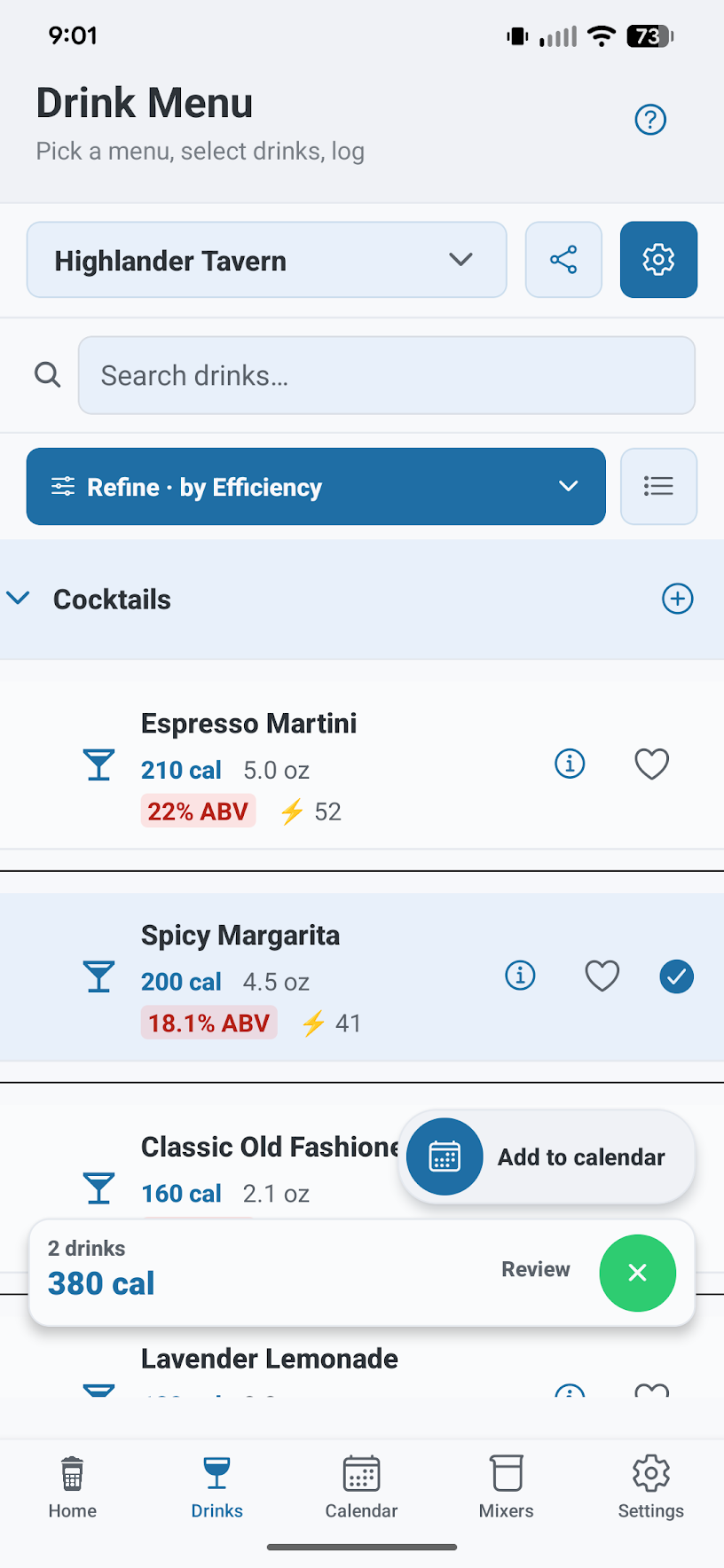
Drink menu screen showing cocktails with calories, size, ABV, and quick add actions.
Compare a menu like a sortable list instead of scanning drink names one by one.

Scan or build a menu, compare the numbers, and keep favorites handy for next time.

Compare drinks

Know what you’re ordering before you order it.

Alcolytics turns drink lists into clear comparisons. See calories, ABV, standard drinks, serving size, and efficiency together so you can choose based on the numbers that matter to you.

Calories Find lighter options quickly.

Compare estimated calories without guessing from the drink name alone.

ABV See strength next to serving size.

ABV is easier to use when the pour size is visible too.

Standard drinks Compare alcohol on the same scale.

Standard drinks translate ABV and serving size into one number, so a tall beer and a wine pour are easier to compare.

Efficiency Compare alcohol relative to calories.

Efficiency gives you a quick alcohol-per-calorie sorting number.

A quick demo See how the same menu changes depending on what you care about.

Calories puts the lightest drink first, so you can choose quickly without overthinking.

  1. Ranch Water 12 oz can
    119cal
    5.99%ABV
    1.2std
    60eff
  2. Frozen Margarita 12 oz can
    360cal
    12.5%ABV
    2.5std
    42eff
  3. Hazy IPA 12 oz can
    214cal
    6.7%ABV
    1.3std
    38eff
  4. Pinot Noir 5 oz serving, dry red
    121cal
    13%ABV
    1.1std
    54eff
  5. Vodka Soda 12 oz can
    100cal
    4.5%ABV
    0.9std
    54eff
  6. Mexican Lager 12 oz bottle/can
    143cal
    4.4%ABV
    0.9std
    37eff

Standard drinks use 0.6 fl oz of pure alcohol per drink. Efficiency is a quick alcohol-per-calorie comparison number, not a health score.

Pro

Create drink menus without typing every line.

Pro helps turn real-world menus, labels, and drink ideas into editable drink lists you can compare, save, and share.

Pro includes a 3-day free trial

Add drinks from a menu photo, container photo, name, or smart query. Alcolytics estimates calories, ABV, ingredients, and mixers when it can, then lets you review the results before saving.

Pro: $3.99 / month or $34.99 / year
3-day free trial in the app
Start in the app
Bulk add

Menu photo

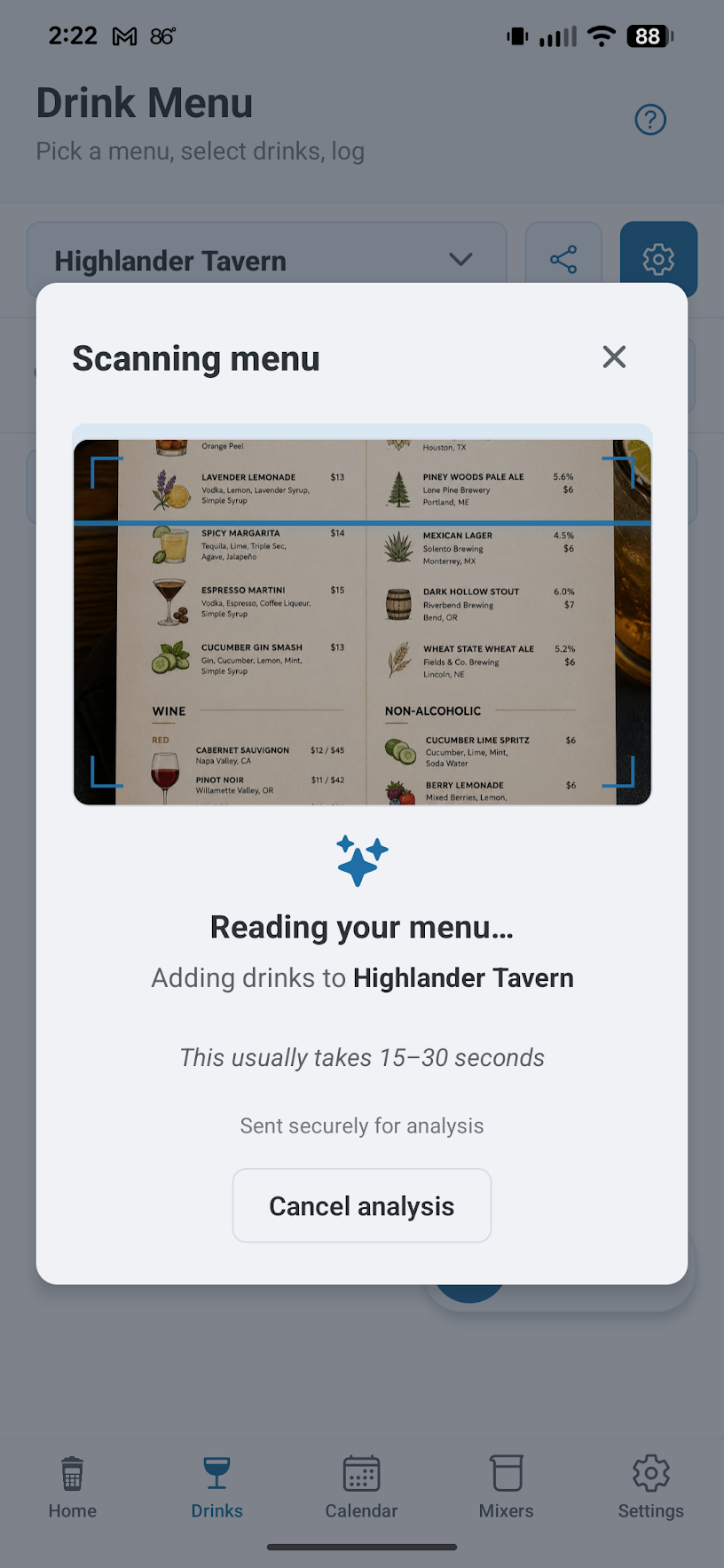
Snap a bar or restaurant menu and add multiple drinks at once with estimated ingredients, calories, and ABV when available.

Lookup

Name or smart query

Look up a specific drink, or ask for ideas like “holiday cocktails under 200 calories” and save the best matches.

Lookup

Mixer lookup

Add mixers and common extras so calories and ABV are closer to the drink you actually had.

Sharing

Link sharing

Share reusable drink menus or individual drinks with simple links that open directly in Alcolytics.

Features

Everything stays connected in one place.

Compare drinks, build reusable menus, log drinks faster over time, and review schedules, limits, and history from the same app.

1. Comparison views

Compare drinks from the same menu or list.

Calories, ABV, serving size, standard drinks, and efficiency stay visible together, so it is easier to compare drinks without jumping between screens.

  • Sort menus by calories, ABV, standard drinks, or efficiency.
  • See serving size and strength in the same place.
  • Use efficiency as an alcohol-per-calorie sorting helper.
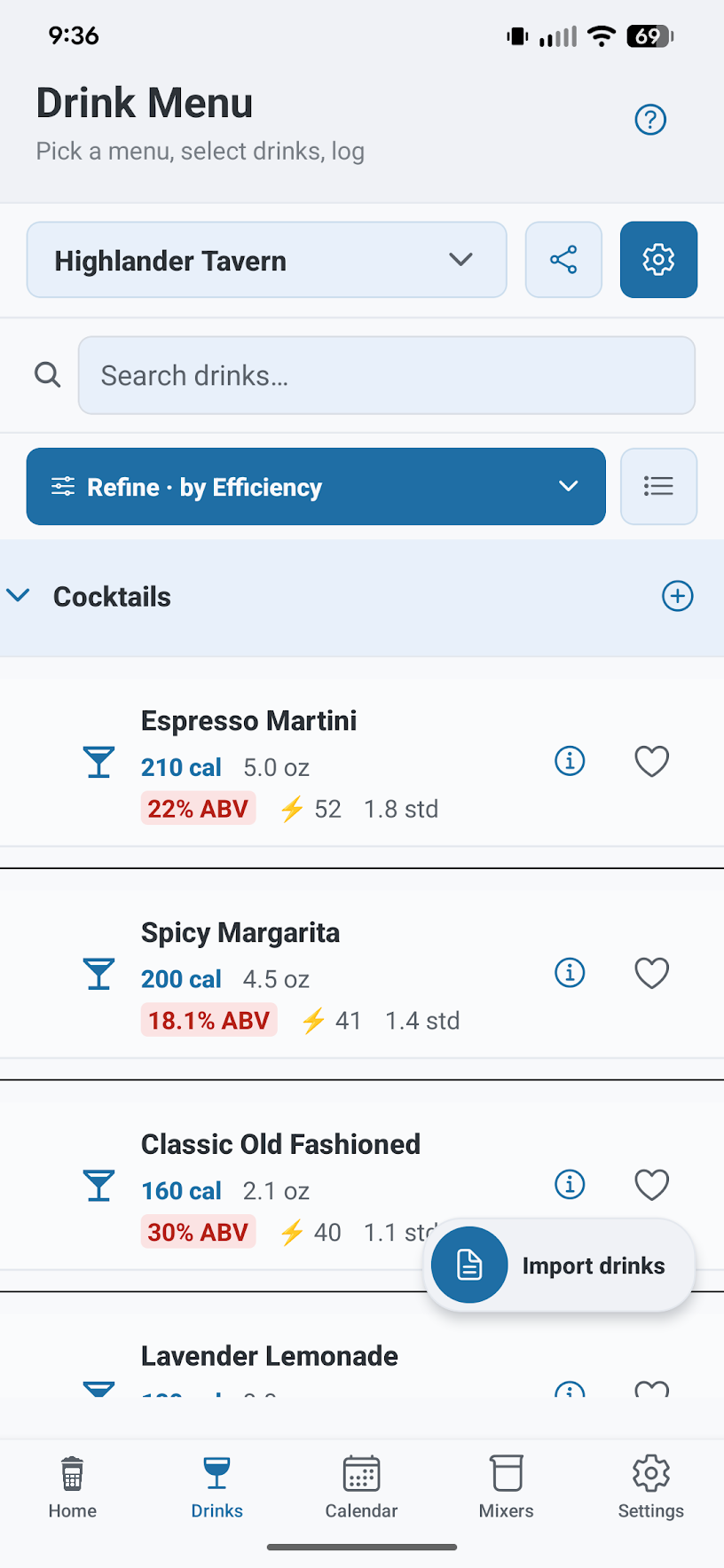
Drink menu screen showing cocktails with calories, size, ABV, and quick add actions.
Menu views keep calories, ABV, serving size, and efficiency easy to compare.
2. Reusable drink lists

Build once, then log in a few taps.

Alcolytics is designed around reusable drinks and menus. Create drinks once, organize them into menus, then quickly log them later from the dashboard, calendar, or recent drinks list.

  • Quick log drinks directly from saved menus.
  • Re-log recent and commonly used drinks fast.
  • Search any menu from the dashboard for a quick log today.
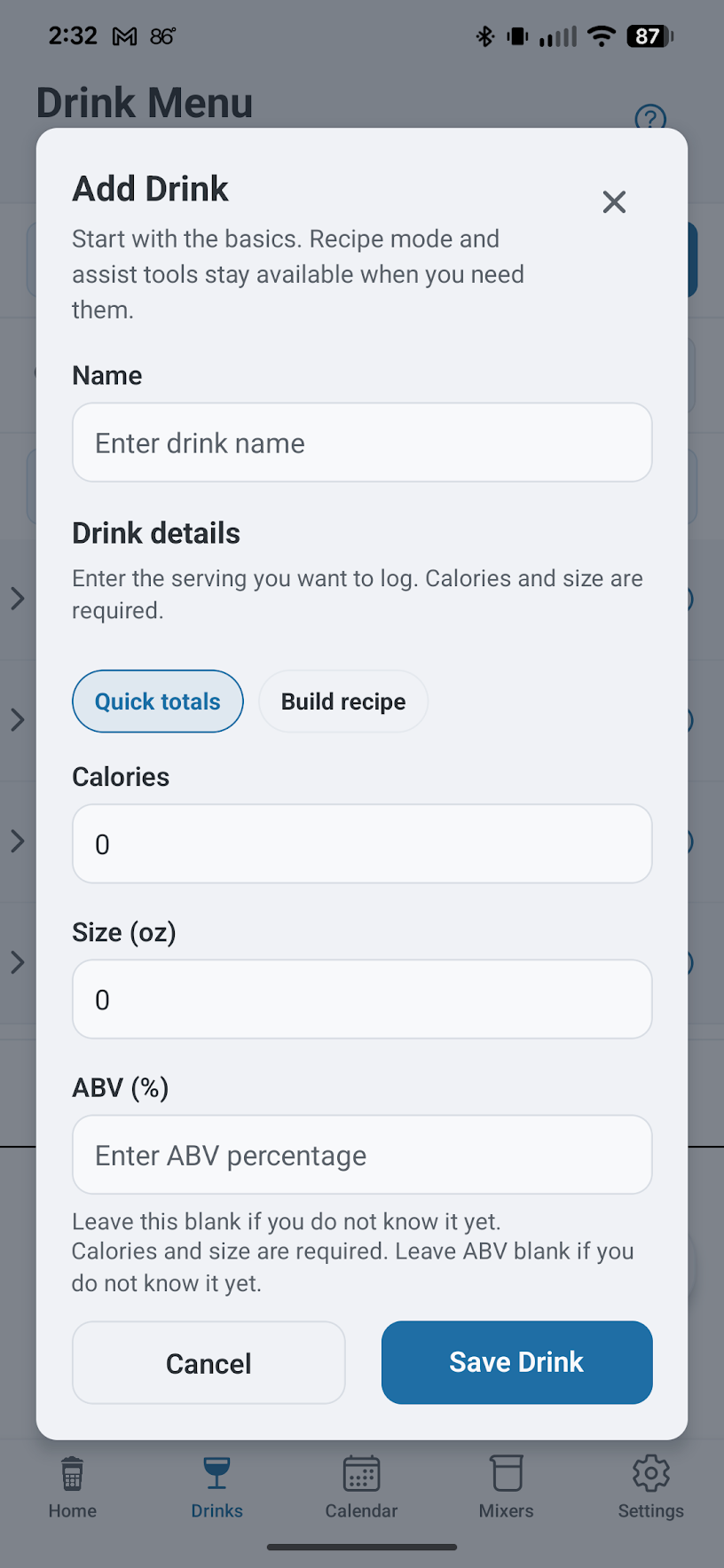
Add Drink screen with quick totals, build recipe, calorie, size, and ABV inputs.
Build and edit drinks with size, ABV, calories, and ingredients before adding them to menus.
3. Calendar and history

Keep drinking days, logs, and limits easy to review.

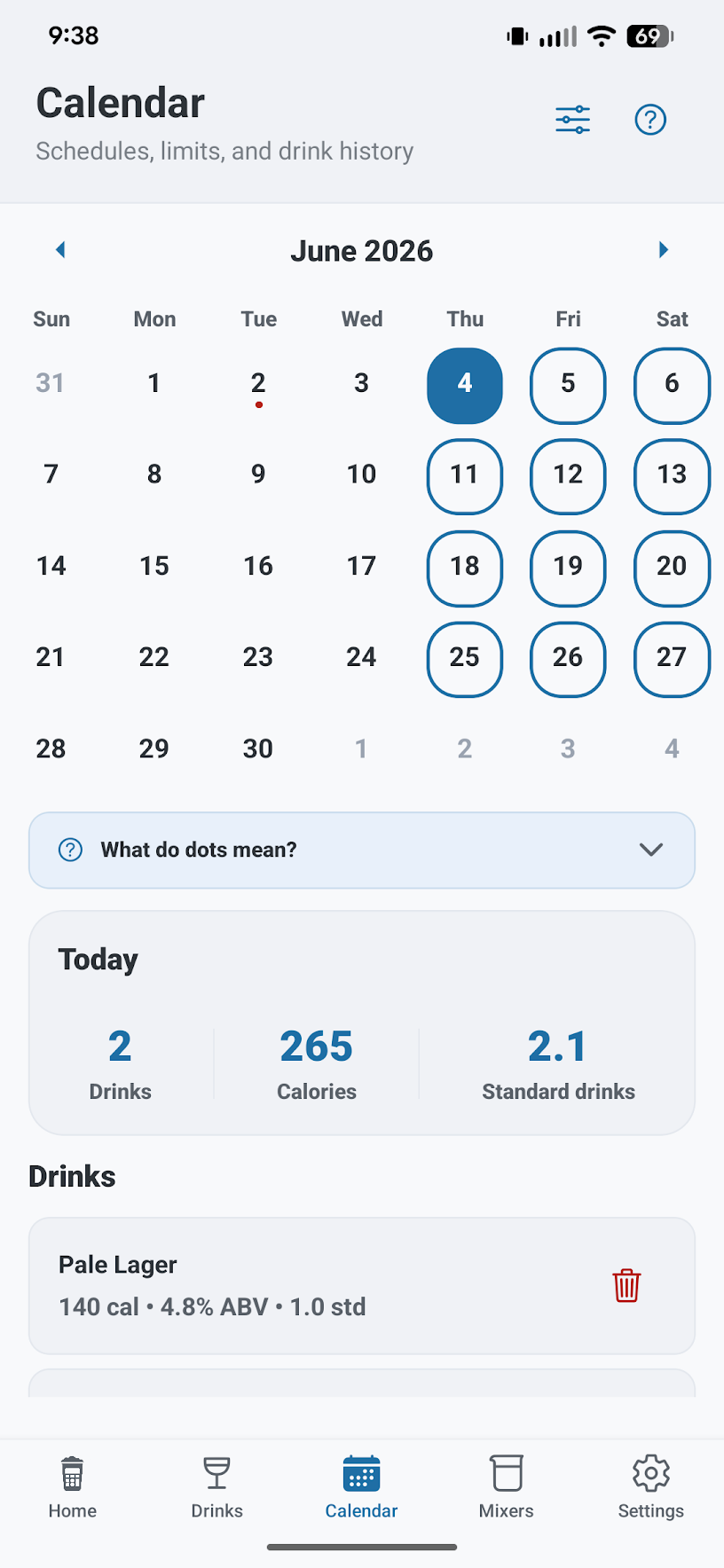
The calendar view helps you keep track of scheduled drinking days, logged drinks, one-time events, blackout dates, and daily limits in one place. Tap any day to review drinks, calories, and quick logging options.

  • See scheduled drinking days and one-time events like birthdays.
  • Review logged drinks, calories, and over-limit days from the calendar.
  • Tap a day to manage drinks or quickly add more entries.
Calendar screen showing drinking days, today's totals, and recent logged drinks.
Calendar views make schedules, drink history, daily totals, and limits easy to review.
4. Plans and limits

Keep your plans visible throughout the week.

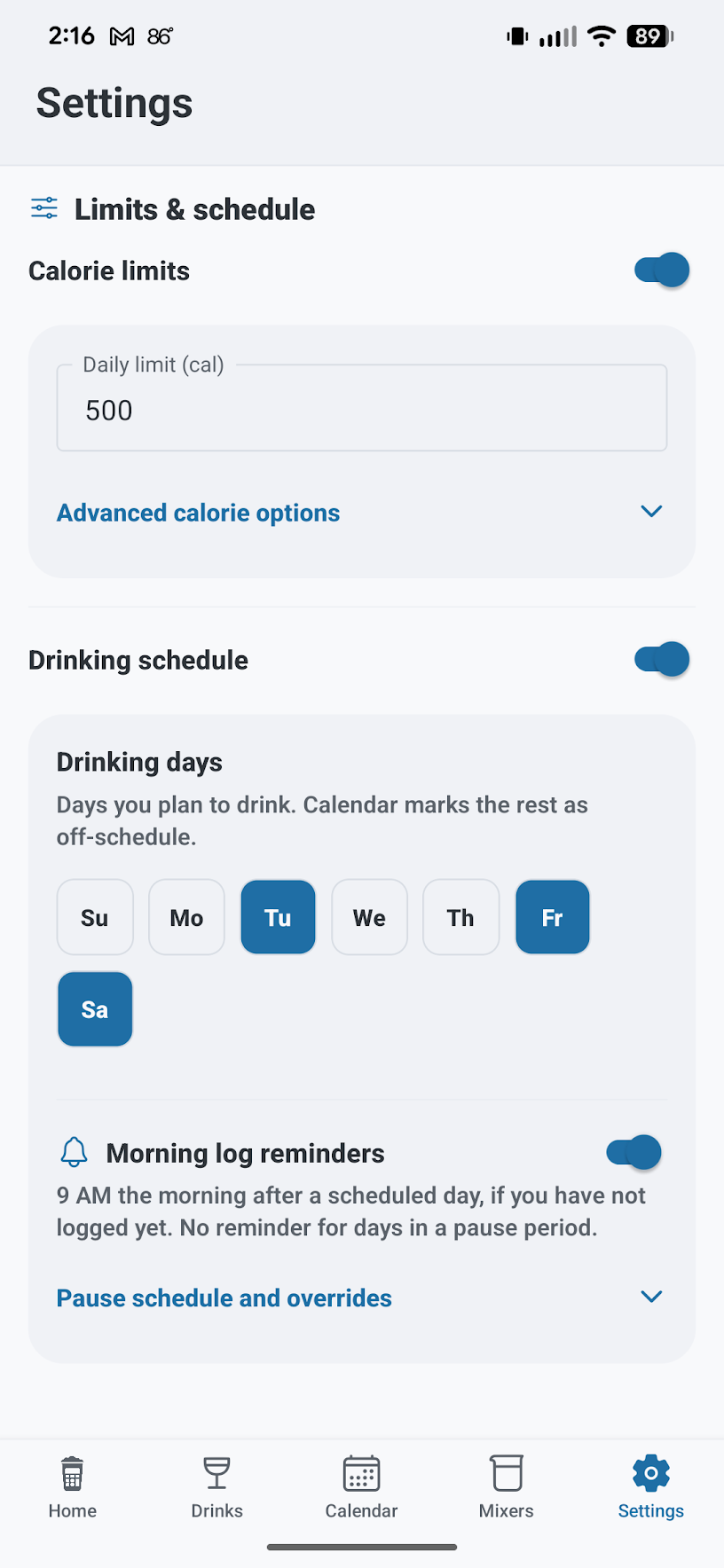
Alcolytics can show whether today is a scheduled drinking day, your daily and weekly calorie goals, and how much you have already logged. The goal is simple context you can check at a glance.

  • See remaining calories and drinks for today and the week.
  • Schedule planned drinking days ahead of time.
  • Optional reminders can help you remember to log drinks the next morning.
Limits and schedule settings with calorie limit, drinking days, and reminders.
Limits and schedules are adjustable, personal, and easy to review.
5. Sharing

Share drinks and menus with a simple link.

Share a full menu or a single drink with a link so other people can open it directly in Alcolytics.

  • Create reusable menus for bars, parties, trips, or favorite drink lists.
  • Share a menu or an individual drink through your normal share sheet or group chats.
  • Open shared links directly in Alcolytics without rebuilding them manually.
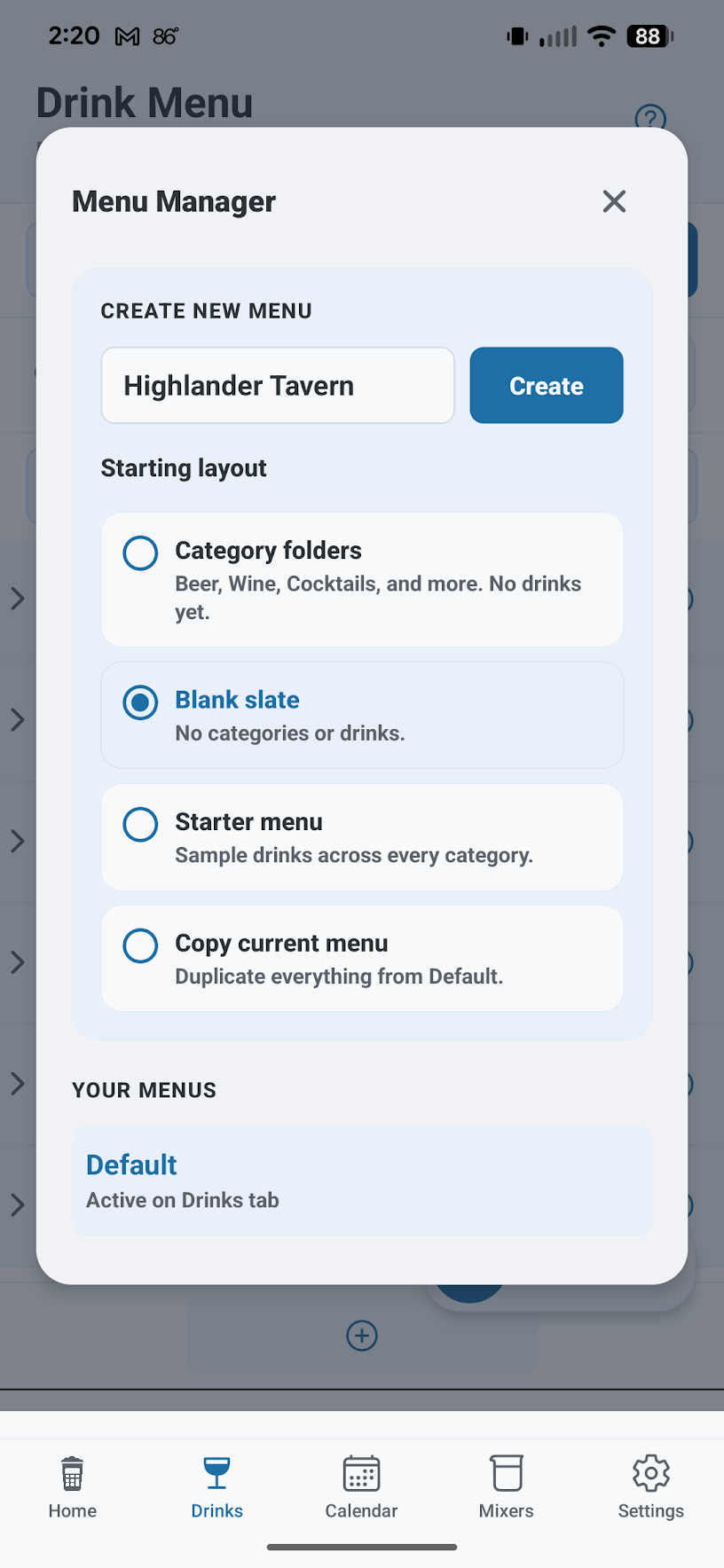
Menu Manager screen for creating a named drink menu and choosing a starting layout.
Build and organize menus that can be shared or reused later.
Scanning menu screen that reads a photographed menu and adds drinks to a selected menu.
AI-assisted menu scanning turns real-world drink lists into app-ready context.
How it works

Build menus, compare drinks, and log faster over time.

Alcolytics is designed around reusable drink lists and quick comparisons. Build or scan menus once, compare drinks by calories and ABV, then quickly log them later from the dashboard or calendar.

Step 01

Build or scan a menu

Add drinks manually, scan a menu, or use AI-assisted lookup.

Step 02

Compare drinks

Sort by calories, ABV, standard drinks, or efficiency before choosing.

Step 03

Log quickly later

Use saved menus, recent drinks, or calendar days for faster logging.

Step 04

Review schedules and history

Check drinking days, totals, limits, and past logs from the calendar view.

Built for clarity

Useful drink information without unnecessary noise.

Alcolytics keeps the focus on practical comparison tools: calories, ABV, serving size, schedules, and reusable menus. The goal is to make drink information easier to use without overcomplicating it.

Simple by design

Focused on quick decisions

Calories, ABV, serving size, standard drinks, and efficiency stay visible where they matter most: while comparing drinks, building menus, and logging entries.

The interface is designed to stay lightweight and easy to scan instead of overwhelming you with charts or warnings.

Privacy-minded

You control what gets shared

AI features help estimate drink information from menus, photos, and text, but you review results before saving them.

Shared menus and individual drinks only work through direct links, and are not publicly searchable or listed.

Sharing

Send drinks and menus as simple shareable links.

Share a full menu or a single drink through a normal link and open it directly in Alcolytics. Reuse restaurant menus, party drink lists, or send someone one specific drink without rebuilding it manually.

Create Build a menu or pick a drink

Create menus manually, from scans, or with AI-assisted lookup, or choose a drink to share on its own.

Share Send a simple link

Share a menu or an individual drink through text messages, group chats, or your normal share sheet.

Open Import into the app

Open the link in Alcolytics and start browsing or logging drinks right away.

Get started

Compare drinks with clearer information.

Use Alcolytics to compare drinks by calories, ABV, serving size, and efficiency. Build reusable menus, log drinks faster over time, and use AI-assisted tools when you want help creating drink lists from real-world menus.

App Store and Google Play links will be added here when the public release is available.